Search your saves by describing them
Type what you remember, in your own words, and Noodle finds the save even when it uses different words. Filter by source, category, tag or date, or search by voice.
On this page
Search finds a save from a description, so you don't need the exact words. Type "what to pack for Portugal" and Noodle finds your Lisbon packing list, even though the note never says "Portugal". It works offline.
Search for something
- Tap the Search tab.
- Type what you remember in Search your brain…: a few words, a question, a channel name. The box is ready as soon as the tab opens.
- Tap the search key on your keyboard. Results appear, best match first, with "11 results" above them.
- Tap a result to open it.
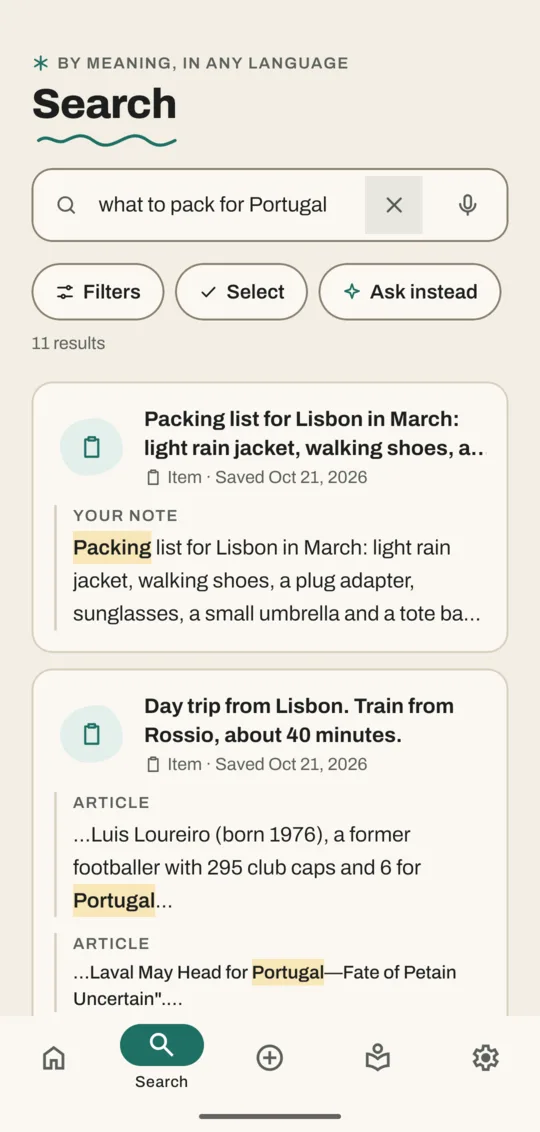
Each result shows the passage that matched, with a label saying where it came from: Your note, Transcript, Article, Caption, Text in image or PDF. If the match is in a video, the result says Play from and a time; tapping it opens the video at that moment. A match in an article or PDF opens the reader at that spot.
Narrow the results
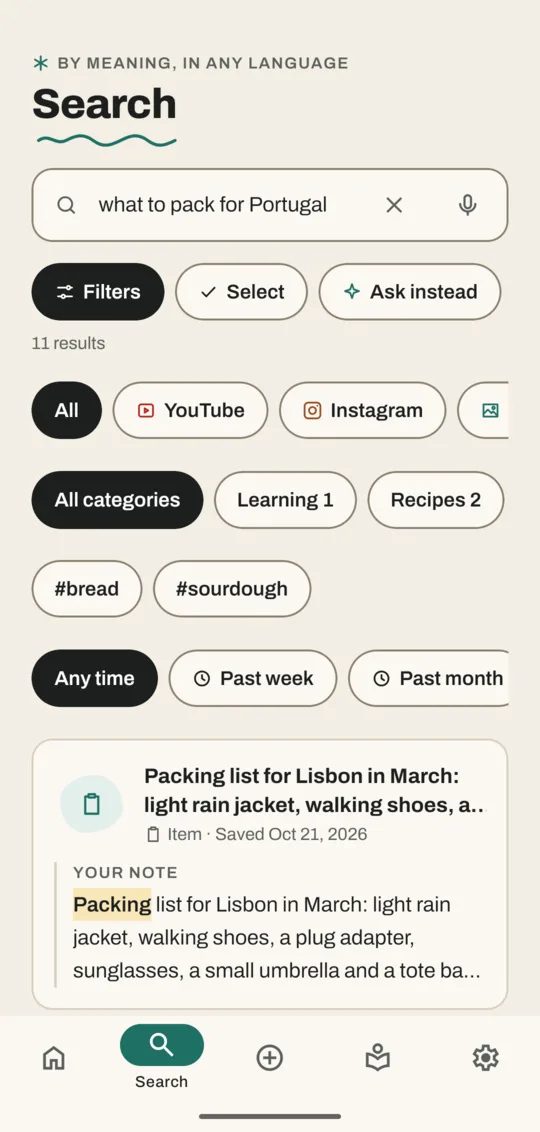
- Tap Filters. Rows of choices open under the buttons.
- Tap a source (YouTube, Instagram, Photos, videos & PDFs and more), a category, a tag such as #bread, or a time (Past week, Past month, Past year).
- To undo a choice, tap All, All categories or Any time in its row, or tap the tag again. While filters are on, the button reads Filters · 2 (the number of filters).
Search by voice
- Tap the mic in the search box. Listening… appears.
- Say what you're looking for, then tap Search.
Nothing you say is saved. Voice search needs the voice download for your language.
Other buttons on the Search tab
| Button | What it does |
|---|---|
| × | Clears the search box |
| Select | Pick several results to file or delete at once |
| Ask instead | Sends your words to Ask Noodle as a question (shows once Ask is downloaded) |
When the box is empty, your recent searches are listed. Clear removes them.
Tips for better results
- Describe the thing, not the file: "the video about fixing a dripping tap" works better than "video".
- Search in any language you set up. Saves in other languages are translated to English so they're found too.
- Photos are found by what's in them once the photo search download is on your phone: "cat on a sofa", "receipt from the hardware store".
- If Noodle shows No close matches, it lists related saves instead. Try other words or remove a filter. With No matches and filters on, Clear filters turns them all off.
Related
Don't have Noodle yet?
Free for Android. No sign-up, and everything stays on your phone.