Download smart features and manage storage
Which optional downloads Noodle offers (voice notes, smarter search, photo search, Ask Noodle), how big they are, how to get them on Wi-Fi and how to delete them.
On this page
Noodle works out of the box with basic English search. Everything smarter is a one-time download that then runs on your phone, offline. You choose what to download, and you can delete any of it to get space back.
What you can download
| Download | What it adds | Rough size |
|---|---|---|
| Voice | Writes down your voice notes and videos in your languages | about 30 to 700 MB, depending on the language (English about 200 MB) |
| Smarter search | Finds things by meaning in 100+ languages | about 200 MB |
| Photo search | Finds photos by what's in them (needs smarter search) | about 110 MB |
| Sharper ranking | Puts the best search match first | about 25 MB |
| Ask Noodle | Answers questions and writes summaries | about 500 MB |
| Translation packs | Translates saves in other languages to English | about 30 MB each |
Sizes are approximate and change between versions. Some languages share one voice download.
Get the downloads for your languages
- Sign in (needed for most downloads).
- Go to Settings and find AI languages.
- Tap Download. Signed in, the button shows the total size ("Download · 210 MB"), then Downloading…, then Downloaded.
Noodle picks what your languages and your phone need. Downloads wait for Wi-Fi unless you choose to use mobile data.
Sharper ranking and Ask Noodle aren't part of this. Get sharper ranking from Models & downloads below, and see Ask Noodle for its download.
See everything that's on your phone
- Go to Settings → Advanced → Models & downloads.
- The top box says how many are ready and how much space they use.
- Each row shows what it's for, its size and Ready or Not downloaded, with Download or Delete.
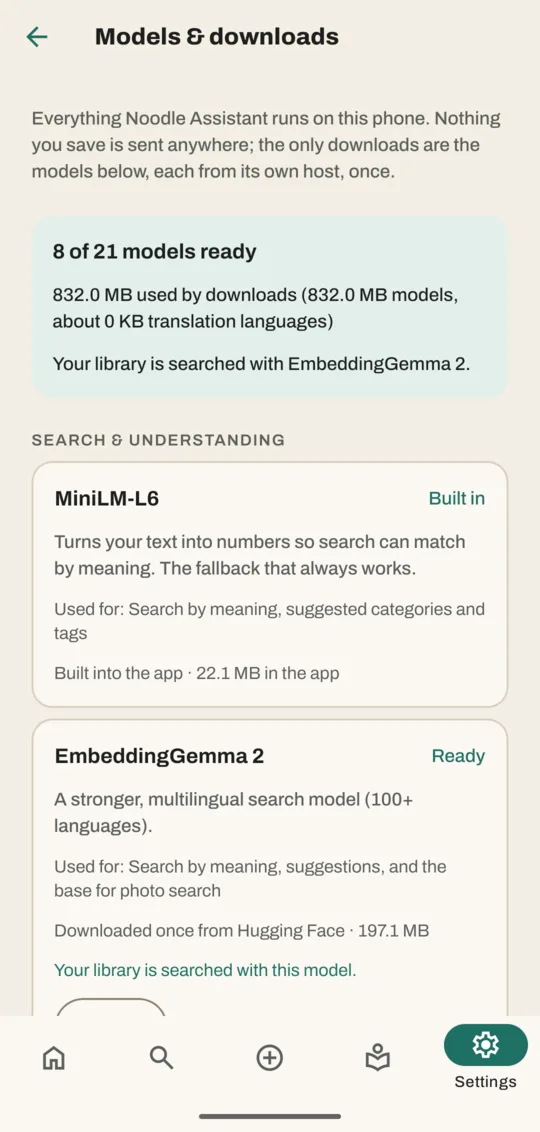
This screen uses the technical names. You don't need to understand them: the "Used for" line under each one says what it does.
Free up space
- Go to Settings → Advanced → Models & downloads.
- Tap Delete on a download you don't use.
Your saves stay. The feature that needed the download stops until you download it again: search falls back to the basic built-in search, for example. Settings → Backup & storage shows how much space your library takes.
Good to know
- Each download happens once, from its own site, and is checked before use.
- Smart features run best on newer phones with more memory. On an older phone they're slower but still work.
- Your saves are never part of a download or upload.
Don't have Noodle yet?
Free for Android. No sign-up, and everything stays on your phone.